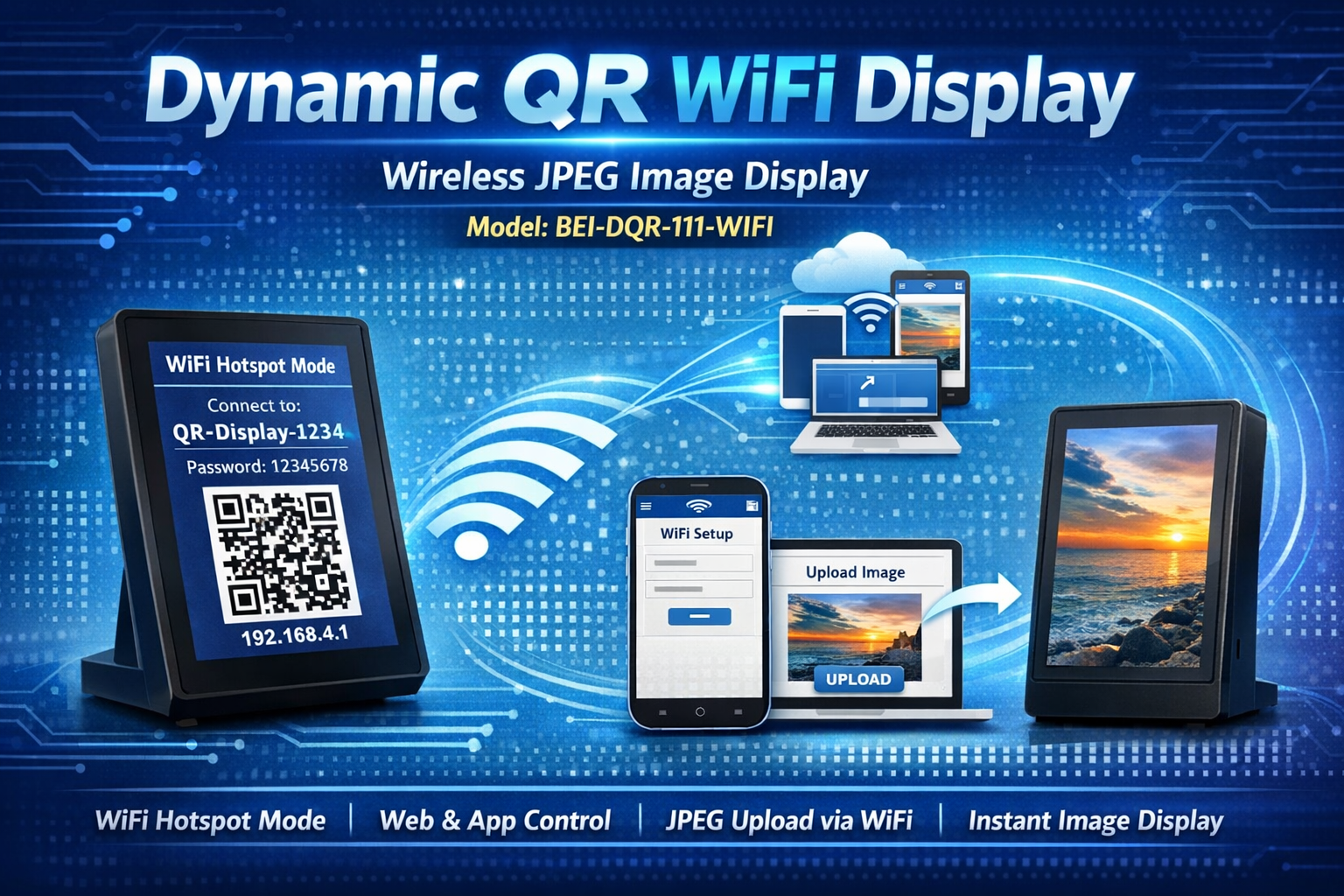
DQR-111 WiFi: Dynamic QR Display with Embedded Web Server
🚀 Wireless JPEG image display via embedded web server, Android/desktop apps & API. 320×480 portrait support, WiFi hotspot setup & real-time image upload. Made in India.
🎬 This video presents a comprehensive guide on how to set up and use the Dynamic QR Code Scanner Display (DQR-111) WiFi Model, designated by the item code BEI-DQR-111-WIFI. This device allows for the wireless display of JPEG images through:
- 🌐 Embedded Web Server: Configure directly via mobile browser
- 📱 Android & Desktop Apps: Upload images via Bonrix utilities
- 🔗 API for Third-Party Integration: RESTful HTTP API for custom billing software
It supports JPEG images with a resolution of 320×480 pixels in portrait mode, enabling users to upload any suitable image via WiFi.
⚙️ Step-by-Step Setup & Operation Guide
- 🔌 Initialization:
- Display starts in WiFi Hotspot Mode immediately after being powered on
- Screen shows WiFi SSID and connection instructions
- 📶 WiFi Connection:
- Connect your Android or smartphone to the display's hotspot using credentials shown on screen
- 🌐 Accessing the Configuration Web:
- Scan the QR code displayed on screen OR manually enter the provided URL in a mobile browser
- Opens the WiFi configuration web page hosted on the device
- 🔐 WiFi Setup:
- Enter your local WiFi network credentials (SSID + password) and save to device
- Device stores credentials for auto-connect on future restarts
- 🔄 Restart and Connect:
- After restart, device auto-connects to your local WiFi network
- Screen displays current connection status + IP URL for further configuration
- 🖼️ Image Upload and Display:
- Access the JPEG Display Web via QR code scan or manual URL entry
- Upload any 320×480 JPEG image to be displayed on the Dynamic QR Code Display
- ✅ Operational Use:
- Uploaded image displays in real-time — demonstrating live visualization capability
- Perfect for dynamic QR codes, promotional banners, or branded welcome screens
- ⚙️ Network Adjustments:
- Reset WiFi settings or switch networks via the JPEG Display Web page
- Device reverts to WiFi Hotspot Mode to accept new credentials
📋 Technical Specifications
| Specification | Detail |
|---|---|
| Product Model | Dynamic QR Code Scanner Display (DQR-111) WiFi |
| Item Code | BEI-DQR-111-WIFI |
| Display | 3.5" TFT LCD, 320×480 pixels, portrait orientation |
| Image Format | JPEG (320×480 pixels optimized) |
| Connectivity | WiFi 2.4GHz + Embedded Web Server + HTTP API |
| Configuration | Mobile browser via QR code or manual URL entry |
| Power | 5V DC via USB — no external adapter required |
| Manufacturer | Bonrix Embedded Innovations, Ahmedabad, Gujarat, India 🇮🇳 |
✨ Key Features & Benefits
| Feature | Benefit |
|---|---|
| 🌐 Embedded Web Server | Configure device via any mobile browser — no app installation required |
| 📤 Wireless Image Upload | Upload JPEG images via WiFi — no cables or physical access needed |
| 🔗 API Integration | RESTful HTTP API for seamless integration with custom billing software |
| 🔄 Auto Network Connect | Stores WiFi credentials for automatic reconnection after restart |
| 🎯 Real-Time Display | Images display instantly after upload — perfect for dynamic QR codes |
| ⚙️ Flexible Network Management | Reset or switch WiFi networks via web interface — no hardware reset needed |
🎯 Ideal Applications
- 🏪 Retail Stores & Kirana Shops: Customer-facing billing + promotional signage via WiFi
- ☕ Cafes & QSRs: Dynamic menu boards + order confirmation displays
- 💊 Pharmacies & Clinics: Contactless payment QR codes + health campaign messaging
- 🎁 Boutiques & Gift Shops: Branded welcome screens + promotional rotations
- 🖥️ Multi-Location Retail Chains: Centralized image management via HTTP API
🔗 Integration Options
- 🌐 Embedded Web Interface: Configure via mobile browser — no software installation
- 📱 Android App: Bonrix utility for image upload + device management
- 💻 Desktop App: Windows utility for bulk image upload + sequence control
- 🔗 HTTP API: RESTful endpoints for third-party billing software integration
- 📡 Cloud MQTT (Optional): Enterprise-scale remote management via cloud server
🔗 Learn More & Get Support
For additional information, technical documentation, or to request a demo, please reach out:
🌐 Website:
www.embedded-innovations.com
📘 Facebook:
Bonrix Embedded Innovations
✉️ Email:
info@embedded-innovations.com
📞 Phone:
+91 94097 45500
💬 WhatsApp:
Chat with Us